Saggar 0.35.0

Saggar 0.35.0 gives you more ways to direct, inspect, and pick up agent work. It adds context controls, observer agents, queued launches, stronger mobile control, and substantial performance and reliability work.

Direct the work
- Turn on Make decisions for me to let an agent answer its own end-of-turn questions, including question menus, continue, and report what it chose. Permission prompts and queued prompts still wait for you, and after three decisions in a row the next question is yours.
- Queue a new agent terminal behind the sessions already running in its project, from the new-session sheet or
saggar agent --queue. Queued launches start one at a time and wait again after a restart. - Ask one agent to review every open session from the command palette, or review an individual session before closing it automatically after a quiet spell.
- Launch a read-only Codex observer beside an agent session, or pair two Codex agents with a structured handoff between them.
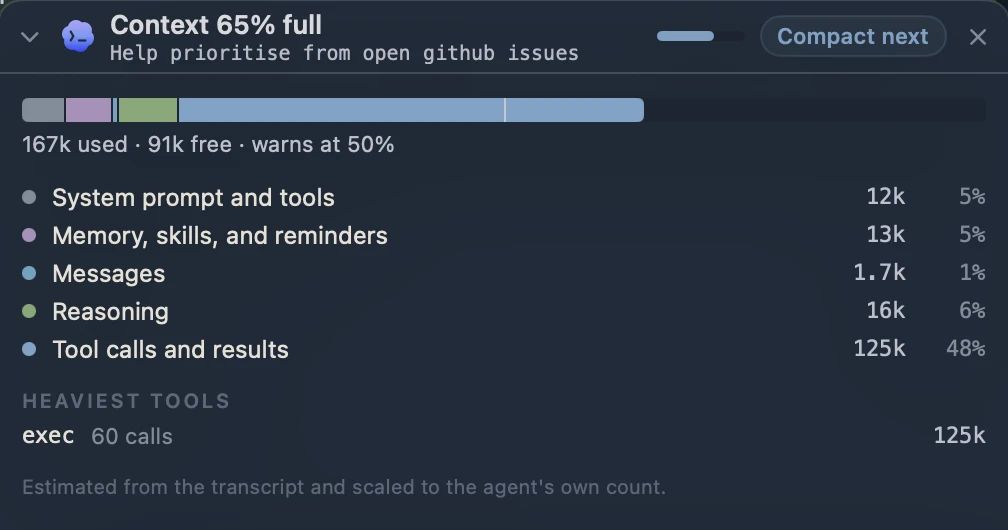
- Follow how full a Claude Code or Codex chat is from a context monitor. Expand it for an estimated breakdown, then compact now or after the current turn.
- Open session analysis as a timeline above either the terminal or chat, with filters for prompts, thinking, actions, changes, compactions, and replies.
- Supervision can hide broad, repeating approvals from attention cards, preview commands before they run, suggest safer alternatives, and keep an exportable local decision history for Pro and Teams.
- Rest on a Needs you card to preview the terminal that led to it. The card also names the command, URL, or file awaiting approval.
Work from any terminal
- Save SSH targets from your OpenSSH config, test them in Settings, and reopen persistent remote tmux sessions from the new-session sheet.
- Resume a closed agent conversation from Project Activity by selecting, double-clicking, or right-clicking its row.
- CLI workspace navigation and command execution now have separate consent. Commands can receive one-time or temporary per-session permission, which you can revoke in Settings.
saggar schemaexposes the public command surface, arguments, outputs, and mutation behavior as versioned JSON.
Mobile and remote control
- Create a local project or GitHub repository on the paired Mac, seed it with an agent task, and open the new session from the phone.
- Move between Sessions and Automations from floating navigation, inspect scheduled tasks and hooks, and answer waiting prompts from the home, conversation, or terminal screen.
- The open conversation streams as small updates, which is lighter on both the Mac and phone.
- See queued runs from the phone, and cancel one or start it now.
- Open terminals faster, keep keystrokes in order during uncertain connections, and keep the screen awake while creating a session or uploading files.
- Pairings now belong to your account. Pair your iPhone once more after updating.
Interface and projects
- Agent sessions now open in the terminal by default. Turn on Show chat when available under Interface settings to keep opening native chat instead.
- The new-session sheet combines launch choice and task setup, with agents, presets, SSH targets, and Shell in one compact menu.
- Project Activity is now a full-width, filterable table. Automations separates configuration from results, adds source and status filters, and shows a seven-day outcome timeline.
- README and documentation previews render Mermaid diagrams offline in light and dark appearance.
- Project commands can carry Dashboard identity and icons, while detected suggestions and saved commands now have separate tables.
- Hook event cards offer Dismiss all when more than one event is waiting.
- Link and image preview cards wait a little longer before appearing, so reading past a link no longer raises one.
Performance and reliability
- Busy terminals and large agent workspaces use less CPU and memory.
- Long project menus and app launch are faster.
- Git status, branch changes, and sync results stay current after quick commands, failed reads, or moved worktrees.
- Automated work waits behind sessions already running in its project.
- Agent status, attention cues, and automatic approvals settle more reliably across the Project menu, Dock, and iPhone.
Removed
- Remote control now works only from the Saggar iPhone app. The web companion no longer controls terminals, and existing browser pairings are removed.
- Project todos, from the Mac and iPhone apps.
- The
saggar tuidashboard. Every othersaggarcommand is unchanged.