Saggar 0.38.0
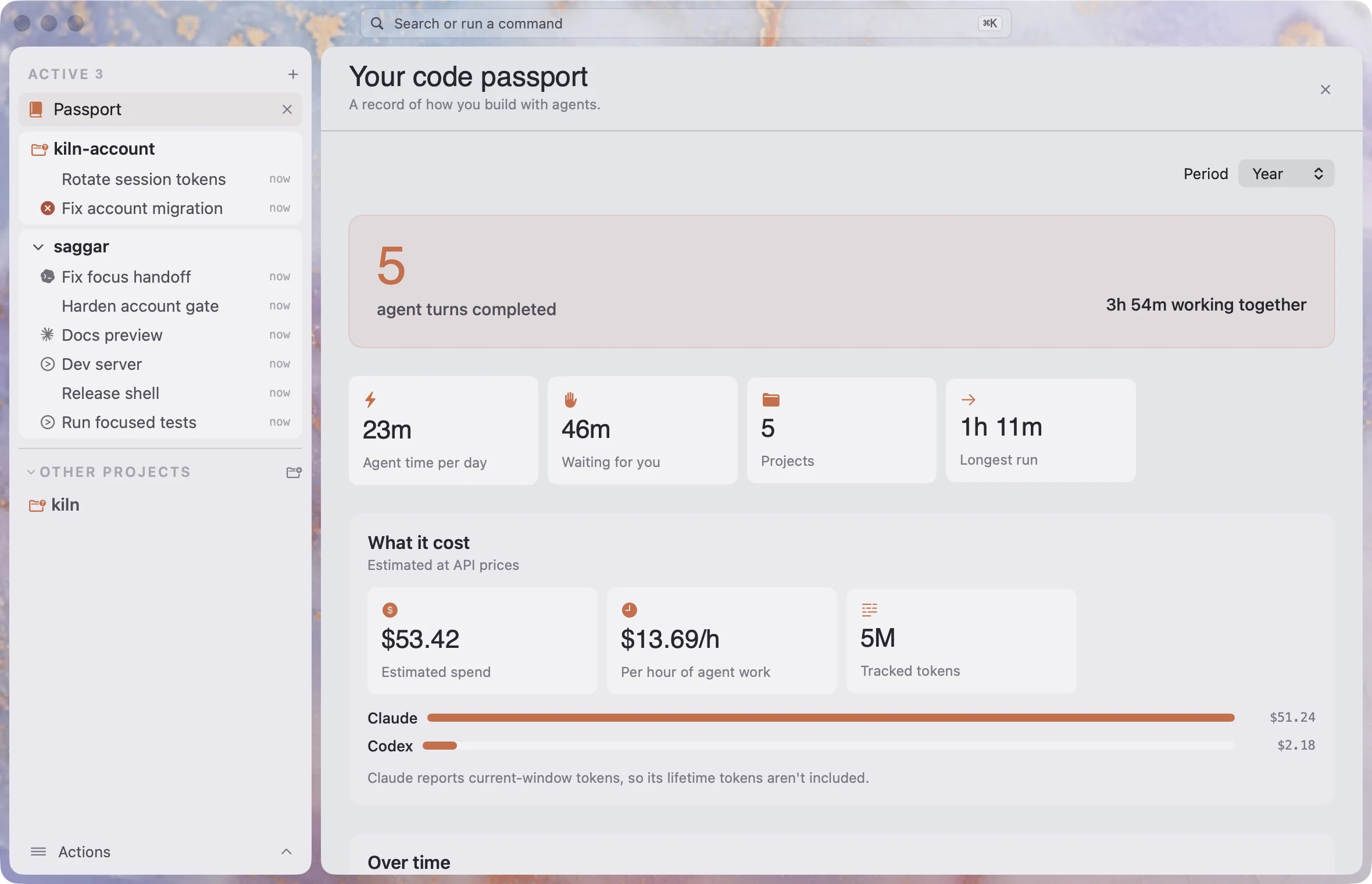
Passport now adds estimated cost to its record of agent work, so you can see spending alongside hours and tokens. This release also adds per-model Claude effort, session presets for scheduled tasks, and a home for commands you use across projects.
New
See what agent work costs
Passport adds tracked tokens, estimated spend by provider, and spend per hour alongside agent hours. Claude's reported cost is used when available; Codex spend is estimated from token counts and a bundled price list. Saggar flags tokens from models without known pricing instead of treating them as free. Recent Passport stamps now show their cost, too.
Give each Claude model its own effort
Choose a default effort for each Claude model in Settings ▸ Agents ▸ Providers. Saggar uses that effort at launch and falls back to its own default when the model or installed CLI doesn't support it. Claude Sonnet 5.5 now appears in the model list by default and starts at medium effort.
Schedule a session preset
Choose a session preset from a scheduled task's Runs menu. The next run uses that preset, including outside a project.
Keep commands for every project together
User-wide saved commands now have their own page beside Sessions, Automations, and Passport. Add, edit, run, or remove them there, or edit ~/.saggar/commands.md directly. Project commands stay with their project.
Pick up after a rate limit
When an agent session hits a rate limit, start a new session with your last-used agent and model. Saggar keeps the same project and working directory and asks the new session to pick up the work.
Know when Claude may run out of plan time
Saggar warns when the combined pace of your live Claude sessions is projected to use up the shared five-hour plan window before it resets. The card shows the rate, plan usage, projected run-out, and sessions contributing to it; the first warning also sends a local notification.
Compact long-running sessions
An optional setting asks supported Claude and Codex sessions to compact when their context reaches your warning threshold. Requests wait until active work and recent typing stop, skip sessions waiting on you, and don't repeat until the context drops.
Updated
Projects follow their folders
- When a project folder moves, Saggar finds it again within a minute, or when you switch back to the app. Its terminals, collapsed state, and selection stay with it.
- After a move, Saggar can carry Claude Code transcripts and Codex folder trust to the new path. It asks first and backs up Codex's configuration before changing it.
A steadier return to work
- Restored and woken agent sessions resume two at a time, so opening Saggar doesn't wake every terminal at once. Each keeps its place until the agent reaches a prompt, or for a minute at most.
- Session analysis now shows readable total and per-phase durations alongside the timeline.
- Passport no longer counts Claude's current context snapshot as lifetime tokens or repeats its cumulative cost after compaction. Existing Claude usage estimates reset once on upgrade; Codex history and agent-time records stay intact.
Safer supervision
- Intercept now holds an agent's edits to the configuration that supervises it, as well as risky shell commands.
- When the Mac falls behind, Turbo waits for a prompt to appear on time before answering it, instead of typing into a stale dialog.
And also
- Pick the model and effort behind the Everyday, Quick, and Hard launch rows in Providers.
- Collapse all projects from the command palette; Saggar remembers the choice.
- Right-click a skill, instruction file, or agent definition in Agent context to reveal it in Finder.
- Queue a prompt for the focused live session with ⌘⇧E.