Saggar 0.37.0
Use Opus 5.5 and GPT 6, see your corresponding pull requests, and more.

New
Opus 5.5 plus GPT 6 Sol & Luna
Saggar now supports Anthropic and OpenAI's new flagship models.
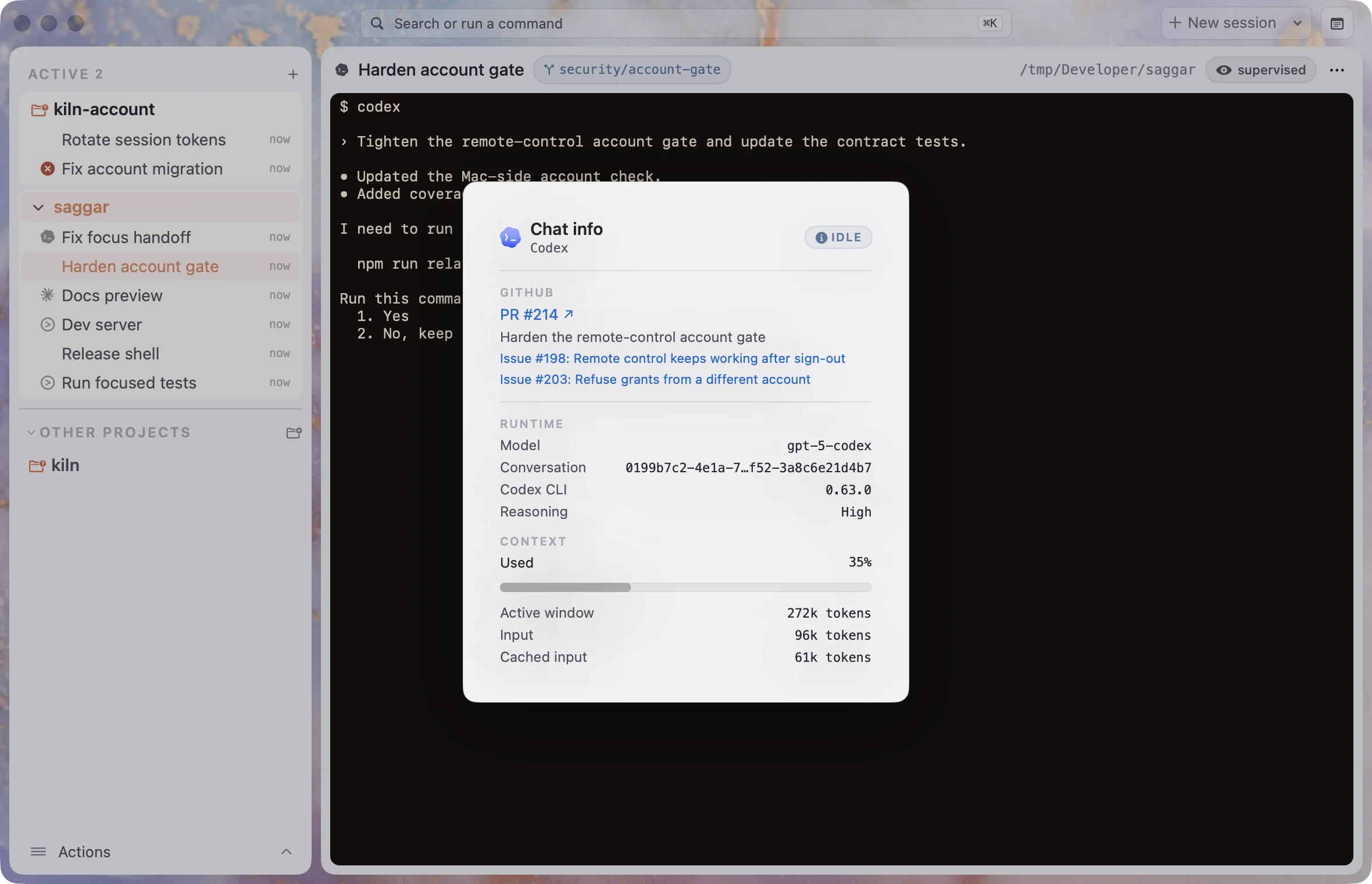
Sessions X pull request
An agent session shows the pull request for its work and the issues behind it. When the pull request is merged or closed, Saggar gives you 10 seconds to keep the session before closing it. Prefer it another way? Choose to always keep sessions, or close them without asking, once nothing is running.
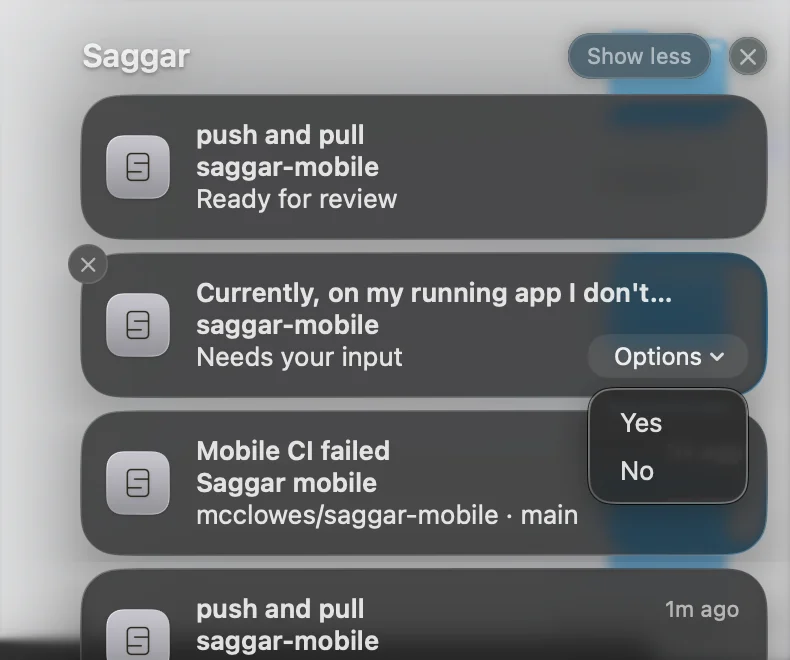
Answer prompts from a notification
A Needs you notification now carries the prompt's choices. Pick one from Options and the agent carries on, without you switching to Saggar. It only answers if the same prompt is still waiting and your Mac is unlocked.
See everything you haven't finished
Catching up on lots of agents' work can be a bit overwhelming.
Project ▸ Show unfinished work lists every project with uncommitted changes, unpushed commits, or a branch that was never pushed, including ones you haven't opened in weeks. Pick one and you land on its changes.
Choose Clean up sessions in the command palette, and an agent goes through your open terminals, closes the ones that are finished with their work committed, leaves anything unclear, and tells you what it closed.
Commands and automations for every project
You can now create commands and automations that work across all of your projects.
Put commands you use everywhere in ~/.saggar/commands.md, and they show up in the command palette whatever you're working on.
Schedules and hooks can run outside a project too.
Doodle annotations
Add image is my favorite way to describe visual changes, or any change to a complex interface. You can draw a line across the screenshot as well as pin a comment.
Updated
A calmer launch
- Saggar no longer wakes every terminal when it opens. A terminal that had been quiet for more than two hours comes back just as you left it, with a Resume button, and at most 25 wake at once. Plain shells always reopen.
- Holding ⌘Q quits Saggar when you let go, so the next app no longer quits too.
Supervision you can trust
- Intercept now blocks risky commands from Claude Code and Antigravity before they run, joining Codex and Copilot. Pi and OpenCode are next.
- Saggar holds an agent that tries to change the settings supervising it, or to launch another agent with its prompts switched off, such as
--dangerously-skip-permissions. - A terminal running an agent without Saggar's hooks says so, and offers to install them.
- If you use OpenCode, update it to 1.0.216 or later. Older versions have a security flaw that lets a website run commands through the agent, and Saggar now warns you.
Knowing when you're needed
- Shells waiting on "Press ENTER" or a password read Needs you, not Working.
- The chat view shows a waiting prompt where the conversation stops, with its choices as buttons.
- The Dock icon shows how many sessions need you. It never drew the count before, because Saggar didn't ask macOS for badge permission.
- Every finished agent turn sends a notification while Saggar is in the background, not only long ones. You can turn this off in Settings ▸ Notifications.
- Automatic approval takes Claude's and Codex's session-only choice for reads and edits, so an agent working through file after file asks once.
Claude Code
- Background subagents, monitors, and workflows keep their cards until Claude picks up their results.
- The chat view shows usage limits, sign-in errors, questions, plans, and Claude's "while you were away" recap.
- Task lists are back for sessions without agent teams.
- Idle Claude terminals no longer flash Working together after a restart.
- Saggar follows
CLAUDE_CONFIG_DIR, and leaves a symlinkedsettings.jsonas a symlink. - The effort picker offers
ultracodefrom Claude Code 2.1.203, and a gateway spend limit shows the rate-limit card.
Codex
- Usage limits and provider errors show in the chat view, where they drew nothing.
- Codex terminals read Idle at their prompt instead of sticking on Working.
Finding things
- The Project menu filter matches terminal names, providers, and statuses.
- Search ranks the closest match to what you typed, and finds a project by its folder name as well as its display name.
- Command palette rows show each project's image or emoji.
...and also
- Moving the pointer to a link preview no longer swaps it for another link you cross on the way.
- Queued terminals can be run early with the new Run now button.
- A project with no commands offers to have an agent set them up.
- The new-session menu ends with Manage providers….
saggar message --tolets one agent send a line to any other terminal.- ⌘↑ and ⌘↓ move between sessions again while a terminal has the keyboard.
- A normal quit no longer brings up the crash recovery prompt next launch.
- Controlling an iOS Simulator from the phone no longer crashes Saggar.
- The app menu links to the Saggar Slack community.
- Setting up a hook shows everything you need to paste until its first delivery arrives.
- A terminal no longer takes its name from pasted text.