Status and triage
Sessions classify themselves from their own output. Nothing is configured, no wrapper script is installed, and the shell is a normal shell. Saggar reads the same things you would read if you were looking at it, which is the only reason it works on the agent you started by hand.
The statuses
| Status | Means |
|---|---|
| Needs you | An agent is blocked on a question, or the shell rang a bell. This is the only state that wants a human, and it is the one the menu, the dock badge, the notifications, and the phone app are all built around. |
| Working | Output is moving, a command is in flight, or an agent still has work running in the background. Nothing to do. |
| Idle | A prompt is sitting there, quiet. Often an agent that stopped short and would carry on if nudged. |
| Finished | The shell exited with code 0. Saggar treats that as the close button: on the next beat the session closes and moves to the project's Activity tab, so you almost never see the word on a row. Only a quick run keeps its window. |
| Failed | The shell exited with a non-zero code, or a long job failed inside a live shell. It ranks above a clean finish in triage and stays until you visit. |
| Ready for review | A long job finished inside a session that is still alive, and left uncommitted work behind. Stays until you visit. |
Why Ready for review exists
The five above are classified from the session alone; Ready for review takes the worktree too, which is why it is the one state that can say something was produced.
It exists because the shell outliving the job is the normal case, not the exception. An agent that works for twenty minutes and stops is still sitting at its own prompt afterwards. Nothing exited, so Finished never applies, and without a word of its own it would read as Idle: the same as a session nobody has touched since this morning.
A job that ends having changed nothing shows a tick for 90 seconds and then goes quiet, so the state means work is waiting rather than merely that something ended. "Uncommitted" includes untracked files.
Three limits keep it honest:
- It is never awarded to the session on screen. You were watching.
- "Long" is the same floor as the finish notice in Settings ▸ Notifications: 8 seconds by default, every command with Every command, and never with Never.
- Selecting the session clears the mark. Only the "changed nothing" tick decays on its own; failed and review marks stand until you look.
Working covers background work
An agent's turn ending is not the end of its work. A Codex shell it yielded, or a Claude subagent still running after the parent turn stopped, keeps the session Working until it finishes. A yielded Codex shell holds the claim for at most ten minutes.
What it reads
These signals feed the classifier:
| Signal | Source | Feeds |
|---|---|---|
| Interaction cues | a scan of the transcript tail | needs you |
| Output activity | the pty's own data callback, not polling | working / idle |
| Command marks | OSC 133 shell integration: a command in flight, even a silent one | working |
| Bell | BEL: an agent finished, or wants you | needs you |
| Watch patterns | your own patterns in Settings ▸ Notifications | needs you |
| Program notifications | an urgent notification a program raises with OSC 9, 99, or 777 | needs you |
| Exit code | process termination | finished / failed |
| Session title | what the agent writes there | session name |
| Process tree | a walk of the shell's children | agent presence |
Statuses are re-read every two seconds. Output stops counting as Working after 10 seconds of silence; an agent hook's mid-turn mark holds it through 90 seconds of silence. A row that has been idle for 15 minutes counts as stale.
Interaction cues
The cue vocabulary is deliberately verb-agnostic. Any Do you want to… or Would you like to… counts, so every flavor of approval prompt is caught rather than the three or four somebody remembered to enumerate.
How a claim ends
A Needs you raised by a bell, a watch hit, a program notification, or a
saggar attention call expires after 120 seconds. A bell also clears when
output resumes or you type in that session; the other three clear only when
you type. Selecting the session clears none of them.
Precedence
Where an agent handshake is installed, a permission prompt raises
Needs you by contract, with no transcript scan involved. One thing outranks
even that: an explicit saggar attention call from inside the session, because
it is the only signal that isn't a guess.
Mark as seen is a watermark
⌘↩ on a bell-only Needs you marks it as seen. The mark covers what was
waiting at that moment and nothing after it: a changed prompt, or any later
bell, hook claim, watch hit, notification, or saggar attention call, raises
the session again.
How it asks for you
Status drives five surfaces.
The menu
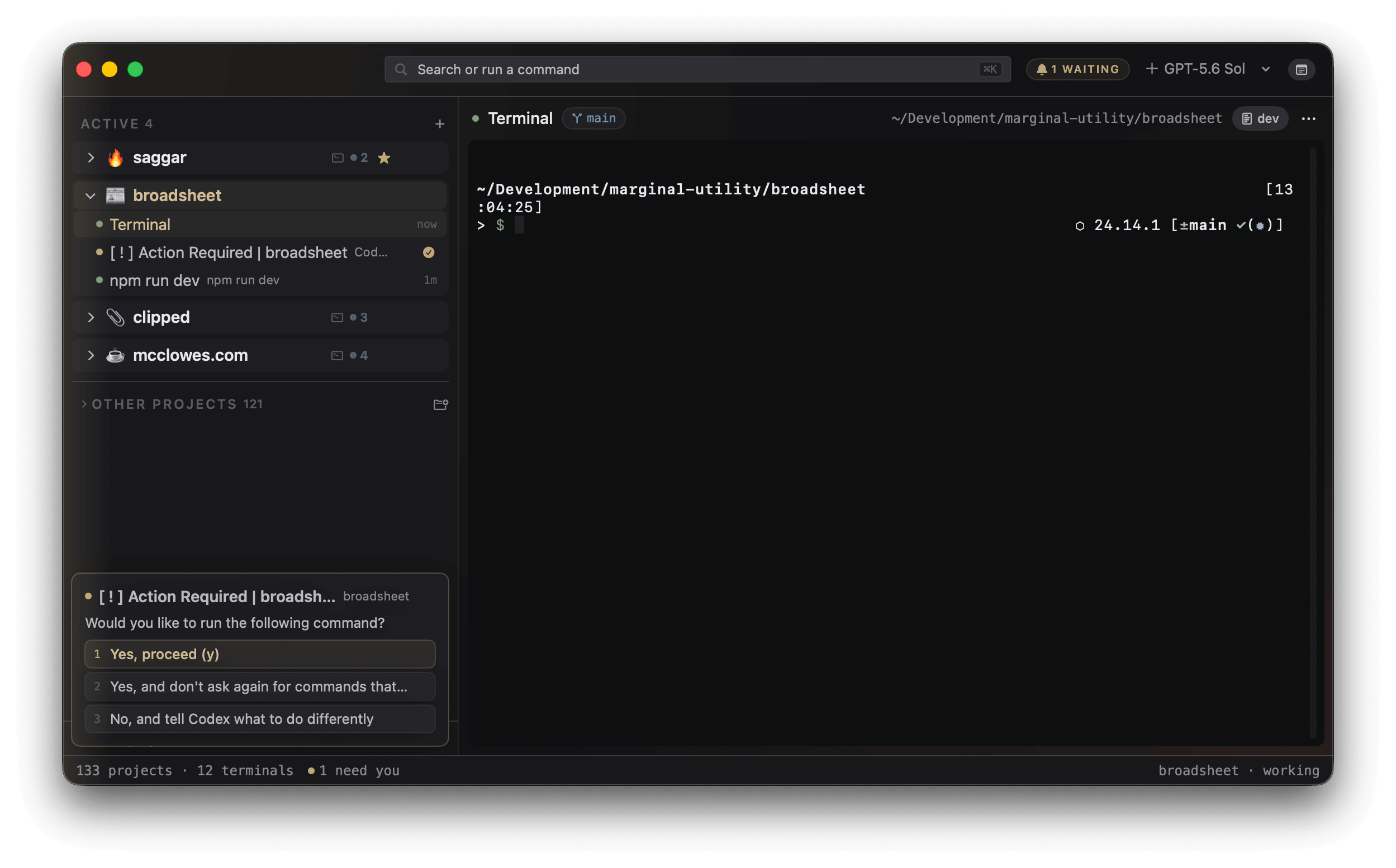
Each session row carries its own mark. A project that has folded its sessions away wears one mark for the lot, the loudest of what is inside: an amber ! for a session that needs you, then a cross for a failure, then an eye for work ready for review, then a tick for a clean finish. A folded project whose sessions are all working or idle wears nothing. The full count, such as "3 sessions: 1 needs you, 2 working", is the row's VoiceOver label.
The attention cards
Blocked sessions stack over the menu's bottom-left corner. The top card shows the waiting question with the prompt's own options as buttons, so it can be answered without opening the session at all. The tally on the top card says how many more cards wait behind it.
The stack holds more than blocked sessions, in this order:
- Sessions blocked on a prompt.
- A pending workspace request from the
saggarcommand. - Hook events waiting on your review.
- Notices that a hook opened an agent terminal on its own. These leave after about ten seconds.
- The result of a decided workspace request.
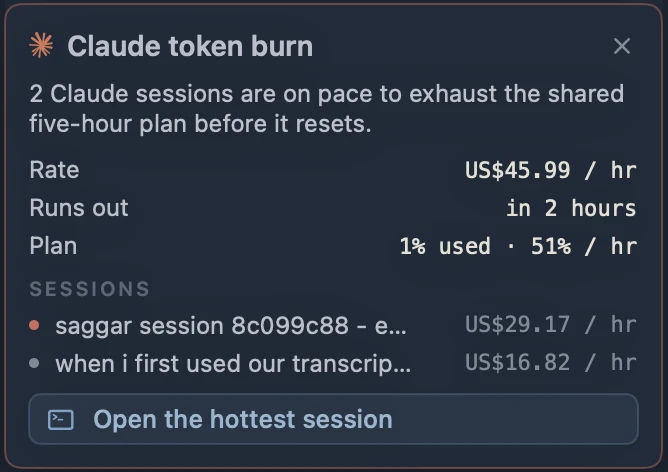
- A warning that Claude sessions are on pace to spend the plan window early.
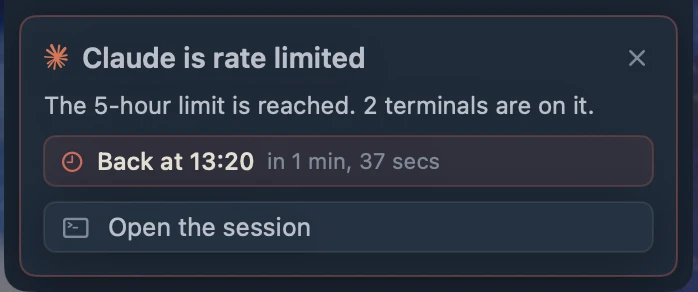
- A provider that has spent a quota window, which says when the account is back and leaves when it is.
The dock badge is narrower: it counts only sessions that need you. A held hook already covered by a running investigation shows no card until that session ends or two hours pass. When more than one hook is waiting, the hook card offers Dismiss all.
A prompt answered from a card or with ⌘↩ hides for five beats. If the screen
hasn't moved by then, the card comes back and says the answer didn't take.
Rate limits
When a provider refuses work because the account has spent a quota window, one card stands for that provider, however many terminals hit it. It names the window, counts the terminals waiting on it, and says when the account is back, with a live countdown. A reset later than today leads with Back tomorrow or Back in N days instead. Open the session jumps to the first terminal that reported the limit, which is where the retry will land. The card leaves on its own once the window resets.
Token burn
Claude's five-hour plan window is shared by every Claude session on the account. When the live sessions together are on pace to spend it before it resets, one card warns you ahead of the limit. It shows the combined hourly rate, when the plan runs out, how much of the plan is used and how fast it's going, and each contributing session with its own rate. Open the hottest session jumps to the one spending fastest.
The first warning also plays the attention cue and posts a notification. After that it stays quiet until the projection clears.
Sounds
Each state change speaks in its own voice: one tone for a new waiter, another for a failed exit, another for a clean finish. One tone per beat, loudest wins, so several sessions turning at once never stack into noise.
It also reads the room. A cue that lands while you are mid-keystroke, in any session, is held and delivered as a single catch-up once your typing has settled for four seconds. A clean finish during that window is dropped rather than held: the menu already carries it. A decision request should never yank you out of thought.
Notifications
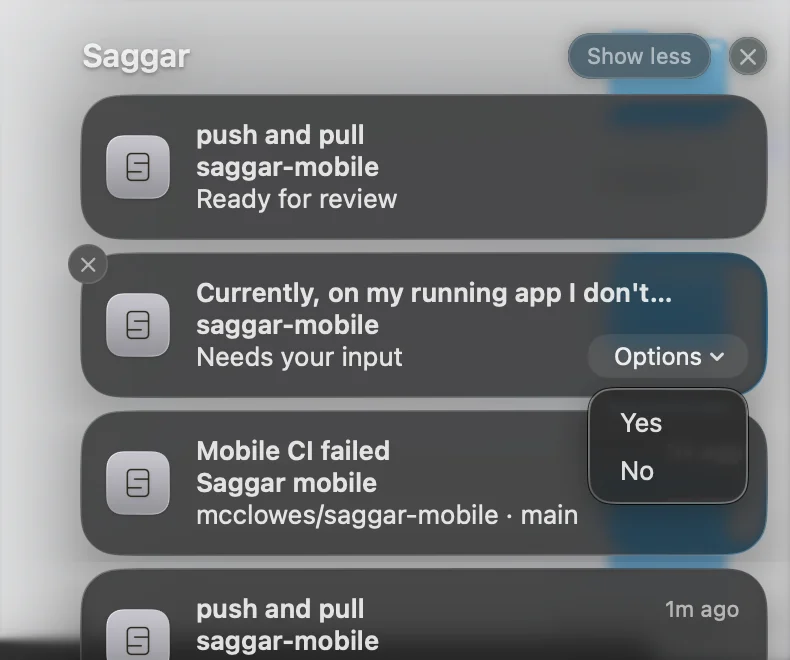
A Notification Center banner posts when Saggar isn't the app you are looking at: a session waiting on you, a shell that just finished or failed, work that became ready for review, or a hook held for review. Tap it to raise Saggar on that session.
-
A waiting prompt is not a one-shot edge, so leaving Saggar with one still open raises it once; the next banner comes only after that session stops waiting and needs you again.
-
A Needs you banner carries the prompt's choices as buttons. Pressing one needs the Mac unlocked. If the prompt has changed or gone by then, the press just opens the terminal. Dismissing the banner silences that waiting stretch.
-
A banner is withdrawn when its claim ends, or when you reach the session from a banner tap, the command palette, the ports panel, or a provider-limit card. Selecting the session from the project menu,
⌘1–⌘9, or⌘Jleaves the banner in place. -
Settings shows whether macOS has allowed banners and links to System Settings when it has not.
Two kinds post even while Saggar is frontmost: notifications a program raises for itself, and command-completion notices.
Command-completion notices
A Command finished or Command failed banner and cue follow a command that ends, gated by Tell me about in Settings ▸ Notifications:
- Every command.
- Only long commands, the default: a command that ran for 8 seconds or more, timed by the shell's own marks. A further toggle, Every finish while Saggar is in the background, drops the floor once you've switched away.
- Never. A shell exiting, and a session that needs you, still speak.
Your phone
The same events, over remote control, if you have armed it.
Triage: ⌘J
One key walks every session with a claim on you, loudest first. The order is fixed, and it is the app's opinion about what a claim actually is:
- Blocked on a prompt
- Failed: an exited shell, or a long job that failed inside a live one
- Ready for review: uncommitted work left by a long job in a live shell
- Finished clean, which in practice means a quick run: an ordinary clean exit has already closed itself
Within a class, longest-waiting first. Each press selects the next stop, raising its window if it has been popped out.
With nothing waiting, the key shows a brief 0 waiting card instead. The app's whole question is answered with no one, which is a better end to the walk than the key going dead.
Answer the session in front of you
⌘↩ types a waiting prompt's default answer, or marks a bell-only needs-you
as seen, and falls through to the shell whenever there is nothing to answer.
The palette has bulk versions of the same idea:
- accept every waiting prompt;
- tell every idle agent to continue;
- close all the idle ones.