Agents
Saggar is a terminal manager, so an agent is just a program running in a shell — but it is the program the whole app was built for, and knowing one is there buys better status, exact resume, and an answer button.
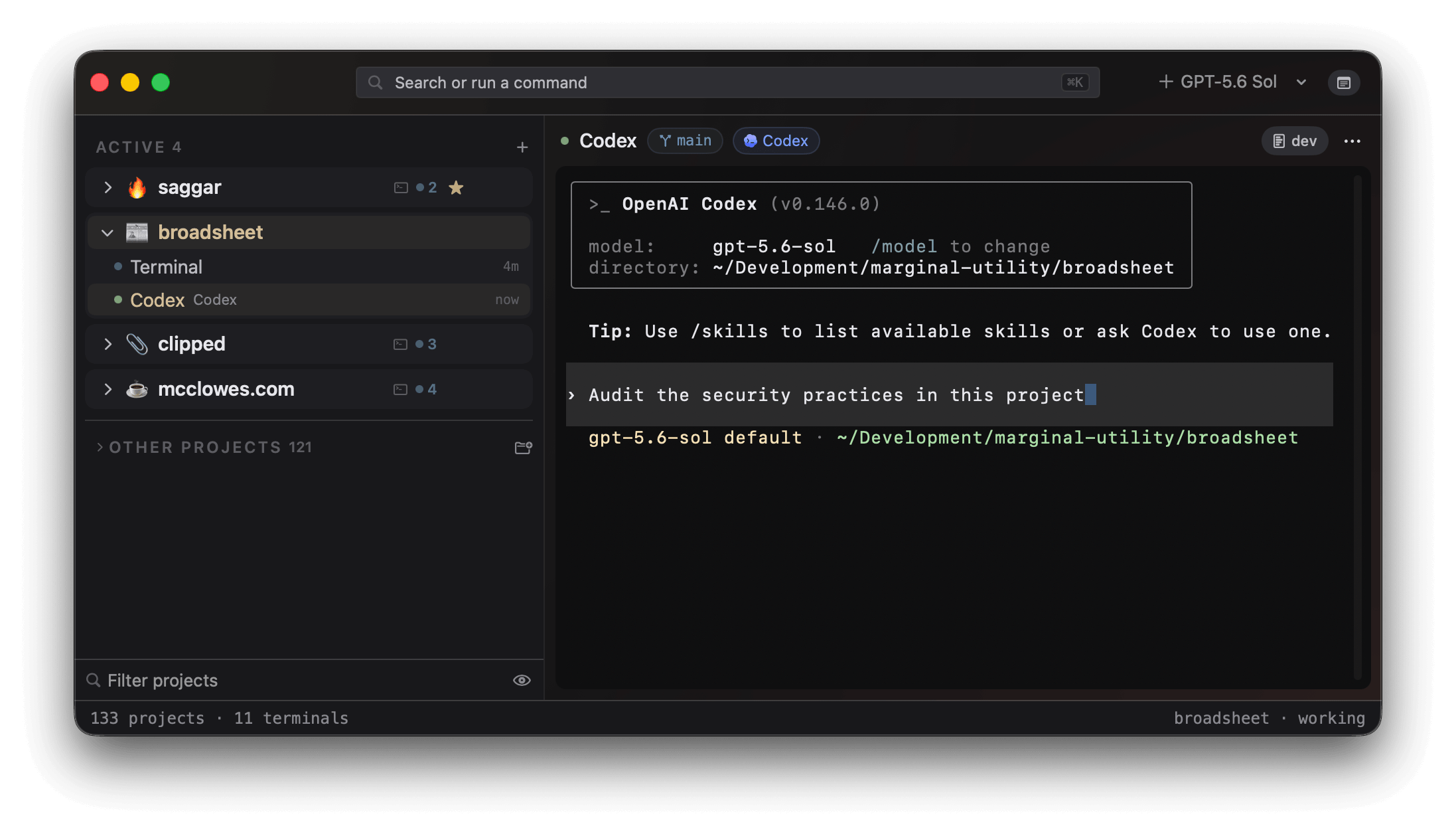
Recognizing one
Saggar recognizes an agent two independent ways, because either alone has a hole.
- The process walk. Saggar walks the process tree under each shell, so a
claude,codex,agy,pi,opencode,copilot, orkimiyou started by hand is recognized exactly like one Saggar launched. - The on-screen scan. When the walk can't name it — an unfamiliar launcher, or a walk that raced the launch — the agent is recognized by its on-screen chrome instead. The chip lights whenever an agent is plainly there and not only when the process tree cooperates.
Your roster
Saggar knows seven CLIs: Claude Code, Codex, Antigravity CLI, Pi, OpenCode, GitHub Copilot CLI, and Kimi Code. Onboarding asks which of them you actually use, and Settings ▸ Providers changes the answer any time. The roster fills the new-session menu, decides which handshakes get offered, and narrows the on-screen scan.
Models
| Providers | Where models come from |
|---|---|
| Claude Code, Codex, Antigravity CLI | Saggar's own catalog. Each provider's card in Settings ▸ Providers has a More models reveal for the rows the catalog hides by default. |
| Codex, GitHub Copilot CLI | The provider's own published list, which replaces the catalog rows when Saggar can read it: Codex's model cache, or the models Copilot's recent session logs say it routed to. |
| Pi, OpenCode, Antigravity CLI | The credentials you have given them. Their cards ask the CLI itself (pi --list-models, opencode models, or agy models) and let you pick which of the reported models get their own row in the new-session menu. |
| Kimi Code | Kimi's own configuration. Saggar offers one launch row that uses the model configured with /login or /provider, without asking Kimi for a model list. |
Claude Code, Codex, and GitHub Copilot CLI also take a reasoning effort, picked per session in the new-session sheet or saved in a preset. The Providers page says where each provider's ladder comes from and how a first task and preset context reach each CLI.
The roster never hides a running agent
Turning a provider off deliberately does not gate recognition. A codex you
start by hand with Codex turned off still lights its chip and still gets
answered, because turning a provider off means "stop offering me this", not
"lie to me about what's running".
Provider capabilities
Any terminal agent can run in Saggar. First-class providers add explicit recognition, launch surfaces, lifecycle integration, exact resume, and other features where the provider exposes them.
A guarded custom resume binding can restore another durable tool without adding it to the provider roster. The Providers section carries the capability table and one page per provider.
Lifecycle integration
Lifecycle integration is opt-in from onboarding or Settings ▸ Providers. Saggar installs its entries in each provider's own hook, extension, or plugin configuration, and removes only those entries when you uninstall it. Provider events outrank process and screen inference when they are available.
Kimi Code has no Saggar hooks yet. It uses process and screen recognition,
and restore runs kimi --continue, reopening the most recent conversation in
that folder. It does not restore each session to its exact conversation or
automatically answer Kimi's permission prompts. See Kimi Code
for its current capabilities.
The process walk and the on-screen scan stay underneath as the base layer, for other CLIs, declined installs, and setups Saggar has never seen. Restoring a project resumes supported agents where they left off.
Following a chat's progress
With the Claude Code or Codex hooks installed, each conversation gets one read-only progress card in the monitor dock. A GitHub Copilot CLI conversation gets one too, fed from its session log rather than a hook. The card stays read-only, so the session itself remains the place to steer the work.
What the card shows
- The spine is the steps the agent means to take: Codex's plan, Claude's todo list, or the tasks it has delegated.
- The agents working a step are nested beneath it. Parallel and nested agents share the same card, whose header reports the step figure, or their aggregate working or finished state when the chat has no plan.
- The step count also rides the session header and the terminal's row in the project menu, so how far along a chat is stays legible without opening it. Hovering a row shows the steps themselves.
Claude's native task and teammate hooks feed the same card, so a delegated task moves from queued to working to finished without Saggar guessing from terminal output. Post-compaction and model-switch hooks keep the conversation's lifecycle details current too.
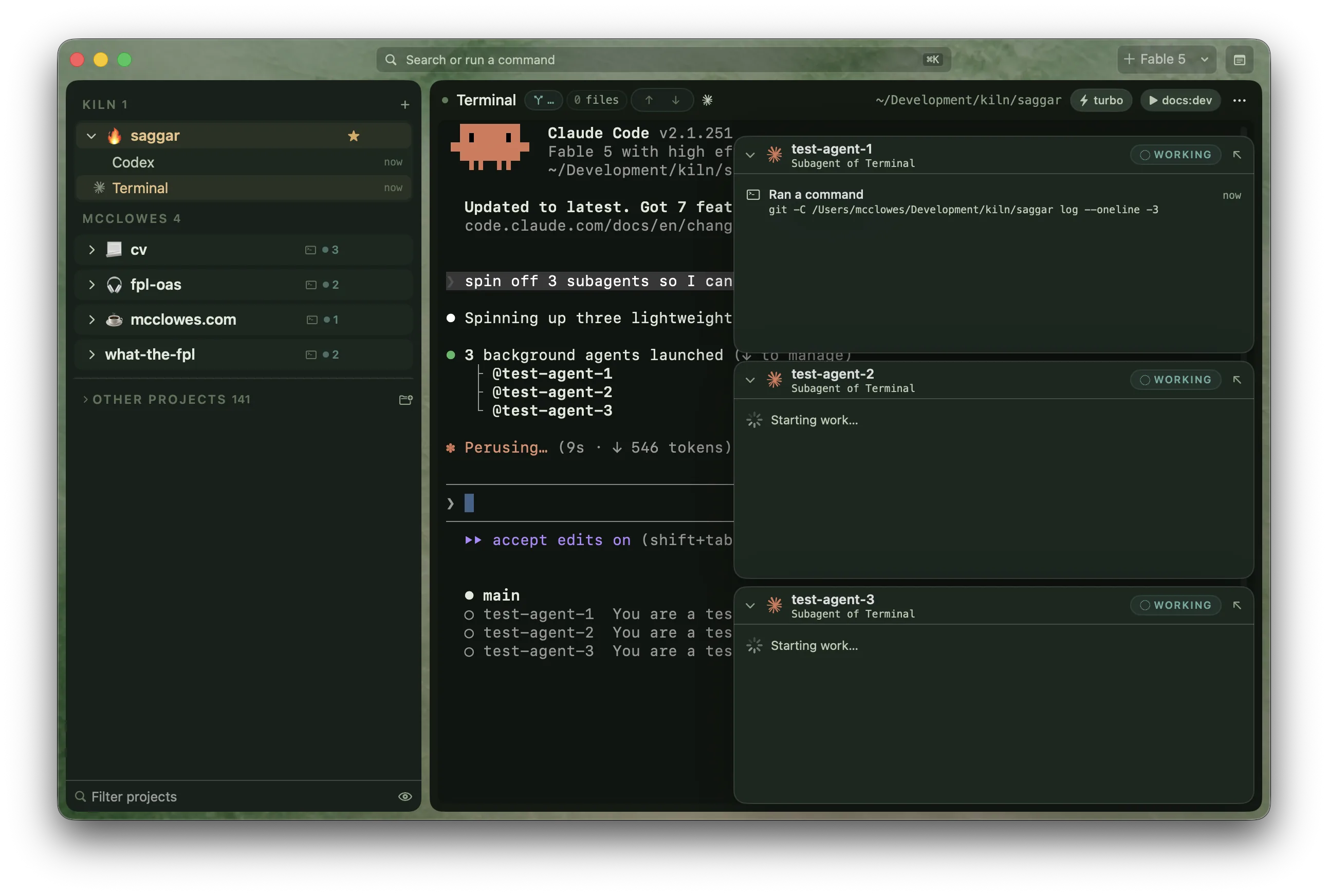
Opening an agent node
Each agent node starts folded. Open it to follow completed tool calls and their file paths, commands, or other short details.
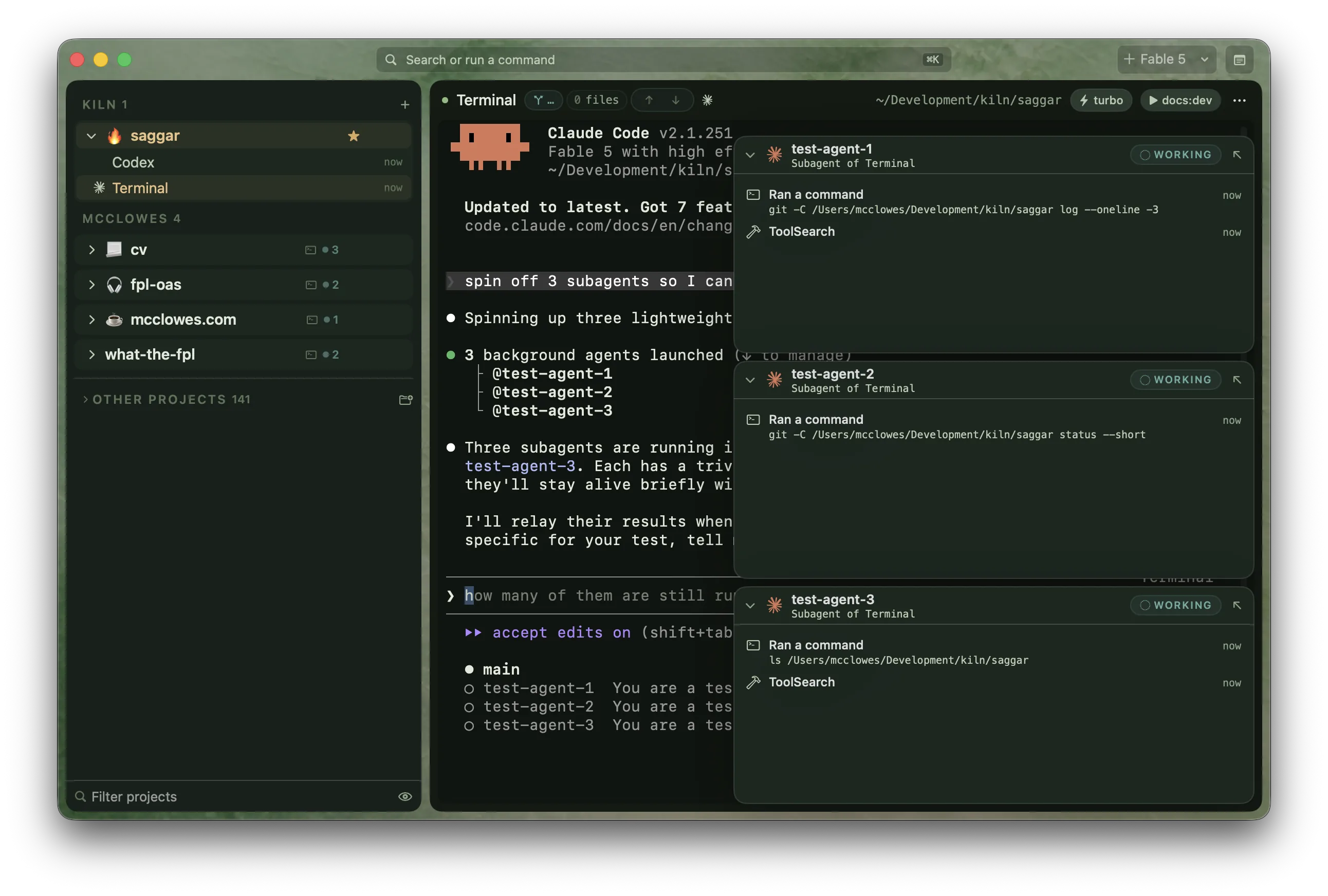
When a subagent finishes, its node shows the result until the parent collects it and finishes the turn. If you try to close the session while a subagent is still working, or before Claude has collected a finished result, Saggar warns you first.
Putting the card away
Dismissing a card puts it away until the work moves; the agents keep running either way. If the cards get in the way for good, turn off Show progress cards under Settings ▸ Interface. The close-time warning stays on.
Watching a chat's context
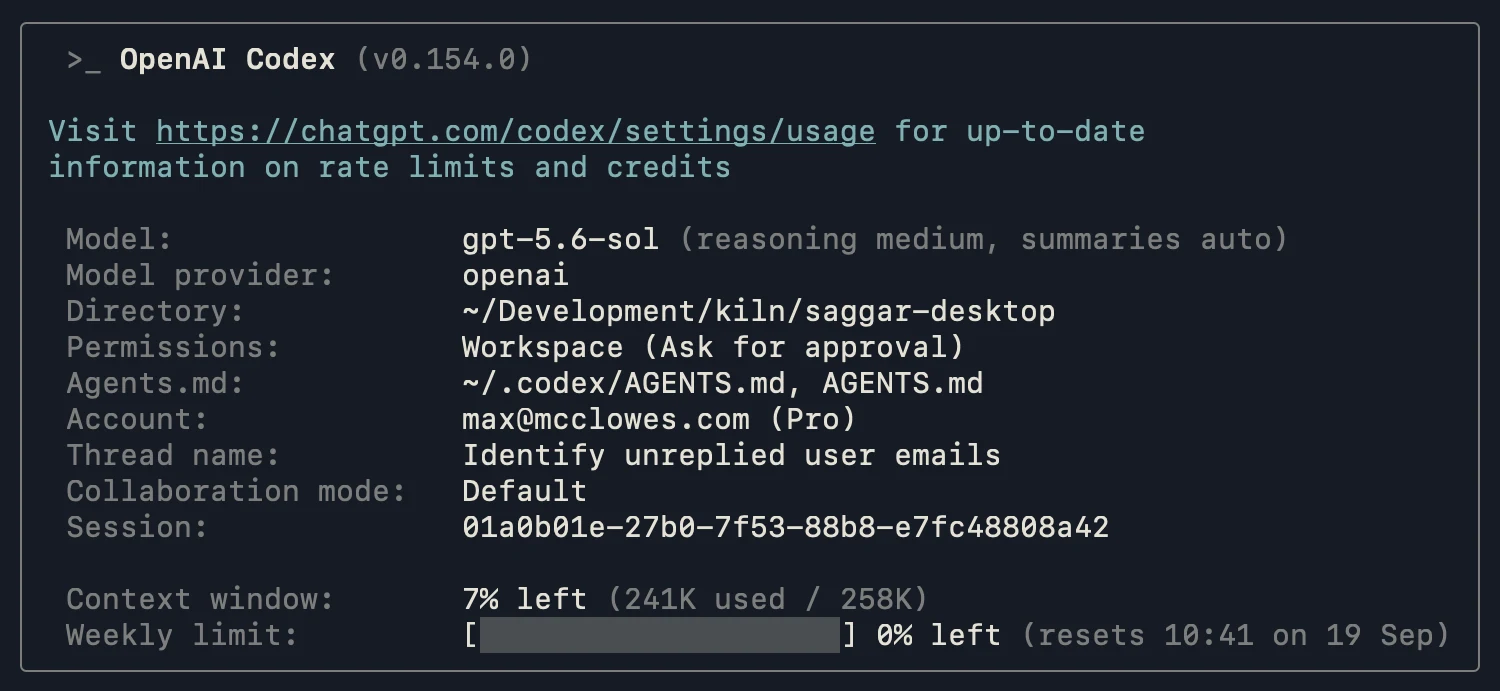
Agents get less reliable as their context fills, well before the window is full. Once a Claude Code or Codex chat passes the warning point, 50% by default, a context monitor docks in the monitor dock with how full it is. It turns urgent at 85%, near where both agents compact on their own.
Saggar uses the agent's own count when it is available. Here Codex reports
241k of a 258k context window used in /status.
Compacting
Compact types /compact into an idle chat. While the agent is working it
reads Compact next and queues the command for the end of the turn, rather
than typing into the middle of one. It waits while the chat needs you. Closing
the card hides it until the context is compacted.
Where the context has gone
Expand the card to see the system prompt and tools, memory and skills, messages, reasoning, and tool calls, with the heaviest tools beneath. The figures are estimated from the transcript and scaled to the agent's own count. The matching Saggar monitor below totals 241k too, while showing what occupies it.
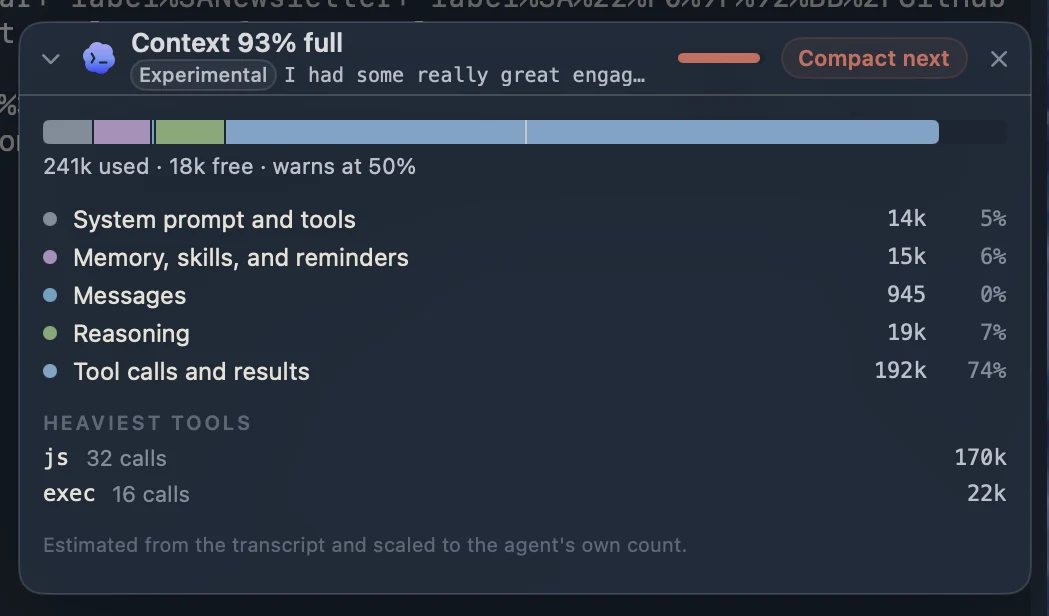
Set the warning point with Warn when context reaches under Settings ▸ Providers. Away compaction uses the same threshold.
The Saggar skill
The handshake teaches Saggar about an agent. The optional Saggar skill works
in the other direction: it teaches the agent the saggar command, when a
session deserves your attention, when a note is enough, and why a monitor and
a quick run are different tools.
It is offered during onboarding and under Settings ▸ Providers for all seven providers: Claude Code, Codex, Antigravity CLI, Pi, OpenCode, GitHub Copilot CLI, and Kimi Code.
How it is installed
- The skill installs as
saggar-cli/SKILL.mdin that provider's user-level skills directory. Saggar never installs it silently. - If the file on disk differs from the copy in this build, the app offers to replace it rather than guessing whether it is old or hand-edited.
- Removing it deletes only Saggar's file and an empty folder, never neighboring skills.
Following a goal
Codex goals appear in a read-only card at the top right of the terminal. The card shows the objective, current status, elapsed time, and tokens used. When the goal has a token budget, it also shows progress against that budget.
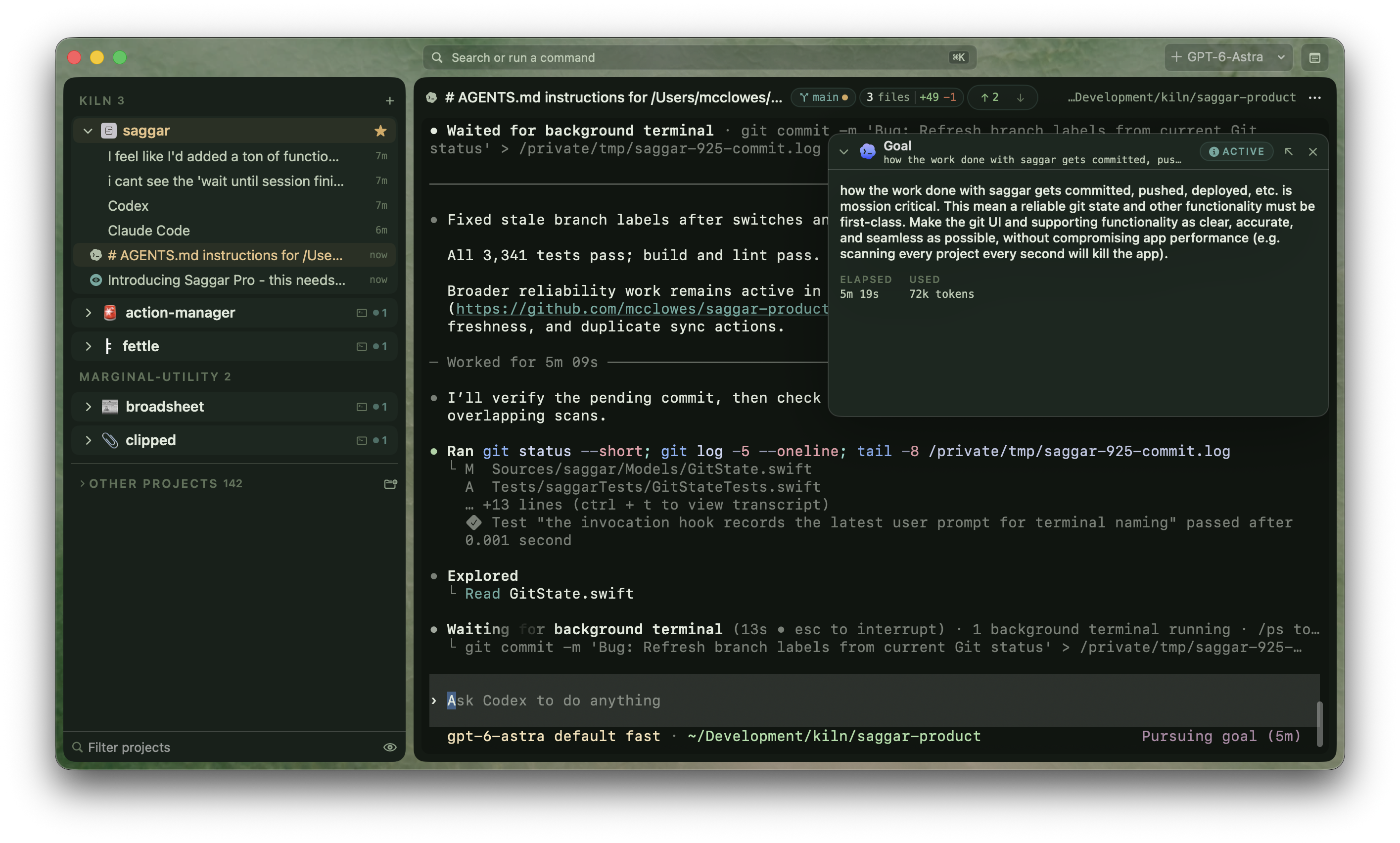
Collapse the card to keep its header visible, or dismiss it to clear the terminal. Dismissing the card leaves the goal running; use the Codex session to steer the work.
Installing a missing CLI
Setup checks every provider in your roster. A missing Codex or GitHub Copilot CLI can be installed through Homebrew; Claude Code, Antigravity, Pi, OpenCode, and Kimi Code each use their own installer.
The same check guards every agent launch, so choosing a model whose CLI has since disappeared opens a visible repair prompt in the terminal before anything changes on the Mac.
Supervision and automatic approval
Claude has Auto mode, and Codex has Auto-review and full access. You can configure each agent's native controls. Saggar adds a configurable layer of your own controls across agents, so the same safeguards apply whichever one is running.
Supervised sessions
Saggar answers a session's routine prompts for you unless the session is Supervised. Supervision is per session and appears as a chip in its header. A prompt Saggar already answered raises neither a banner nor a sound. Being called over to look at something that resolved itself is exactly the interruption automatic approval removes.
The quiet is keyed to the prompt. An unsupervised session blocked on something automatic approval will never answer — an arrow-key wizard, a bell-only needs-you — still reaches you. Unsupervising a session is never a way to go quiet permanently.
Coverage, preview, and decision history
Settings ▸ Supervision shows each provider's coverage and lets you check hook configuration. Configured hooks do not prove that the provider trusts or runs them. Codex's /hooks and /permissions show its effective controls. Intercept checks supported shell calls before they run on Claude Code, Codex 0.153.0 or newer, GitHub Copilot CLI 1.0.85 or newer, and Antigravity CLI. It needs installed, trusted hooks; input sent later to a running shell is not checked again.
Command preview. Test a command against your rules without executing or saving it. The preview explains matching safeguards and suggests a narrower next step. No match means only that the current patterns did not match, not that the command is safe.
Pro and Teams include local decision history. See automatic approvals, requests left for review, intercepted actions, checked actions with no matching rule, and requests Saggar could not inspect. Each entry identifies the provider, session when available, time, decision source, and rule or reason. History covers requests received by Saggar's hooks and recognized terminal permission prompts, not every action an agent takes.
- The latest 1,000 decisions stay on this Mac, separately for each account. Commands, paths, tool arguments, and custom rule labels are not stored.
- Refresh, filter, or clear history in Supervision settings.
- History starts while your signed-in account has Pro access, which Teams inherits. Sign in again after changing your plan to refresh access. Once that access is removed, new recording stops and retained history is hidden until access returns.
- Safety rules, coverage details, and command preview remain available on every plan.
Secret and credential checks. Built-in patterns also hold likely secret-file and credential-file access, commands that print a stored credential, and explicit outbound secrets or environment dumps. These are targeted checks, not complete data-flow analysis: indirect reads, encoded data, and unfamiliar tools may fall outside their coverage. Saggar suggests next steps without rewriting or executing a replacement command.
What it refuses
Automatic approval will not approve a genuinely destructive command. These it hands back on screen for a human to read rather than accepting unseen:
- an
rm -rf, asudo, acurl … | sh; - a force push or a hard reset;
- a raw write to a disk device, a fork bomb, a machine power-off;
- an infrastructure or cloud teardown, a Docker volume delete, a dropped table;
- a package publish, a production deploy or release;
- a world-writable permission change, a change to system services or security settings, a broad process kill;
- an agent taking the wheel of your browser through a browser-automation MCP server.
The list is biased toward false positives on purpose: a false positive costs you one manual approval, and a miss auto-runs something irreversible, which is not a close trade.
What it answers for Claude Code
With Claude's hooks, Saggar answers through its PermissionRequest hook
before the dialog draws. An approval Saggar gives there replaces your review:
Claude runs the request without showing it to you.
So the hook only ever answers the tools whose whole request is text the
deny-list can read: Bash, Edit, Write, and NotebookEdit.
An MCP tool, a fetch, a subagent spawn, or a plan approval stays with you, and
so does anything asked while Claude is in plan mode.
Under Intercept, Claude's PreToolUse hook checks each Bash call before it
runs, including calls Claude would run without asking. A command matching
your safeguards is held for review, and the terminal shows Needs you.
What it answers for Codex
With Codex, Saggar answers through Codex's own permission hook, before the prompt is drawn. An approval Saggar gives there replaces your review: Codex runs the request without showing it to you.
So the hook only ever answers the two requests it can read whole, a shell command and a file edit, and only after the deny-list has read the command text and every other argument. Anything else Codex asks about, such as an MCP tool that declares itself destructive, a network escalation, or a permission grant, is left for Codex to prompt about as usual.
Codex's Auto-review sits inside Codex and can vet the same requests with a model; it complements Saggar's deny-list rather than replacing it.
What it answers for GitHub Copilot CLI
With Copilot's hooks, Saggar answers through its PermissionRequest hook the
same way. Copilot names the two requests Saggar can read whole bash and
edit, and creating a file counts as an edit. A URL fetch, an MCP tool, a
question to you, or a subagent stays with you. Under Intercept, Copilot's
PreToolUse hook also checks each shell command before it runs, on 1.0.85 or
newer.
Antigravity CLI's PreToolUse hook answers its shell commands the same way;
its file, edit, and URL dialogs are still read from the screen. See its
provider page.
The same asymmetry governs remote control, where approve sends a waiting prompt's own default answer and nothing else — see the security model.
Working together
Two providers can put more than one agent on the same work, each in its own Saggar terminal.
- Codex partners. Codex is the only provider that can join a session as
a partner. Observe with an agent… in a live agent session's menu, or
saggar agent --observeor--pairfrom a terminal, opens a second Codex session linked to the first. An observer reads the lead's output withsaggar readand reports without editing. A pairing partner can send the lead concrete concerns withsaggar message, and takes over the worktree once the lead runssaggar handoff. A session holds one link at a time, only the lead of a pairing can hand off, and an observer can't message. - Claude agent teams. Claude Code is the only provider Saggar can start
in team mode, with
saggar agent --team. The lead's teammates open as Saggar terminals, and Saggar resolves the lead's pane targets only to its own teammates, so a team can never type into a terminal outside it. The mode is experimental on both sides.