Saggar 0.26.0

Most of this release is about how Saggar tells you a terminal needs you. It also adds terminal editors, improves Option-key behavior, and makes mobile pairing more reliable.
Thank you to Stjepan, Morgan, Alexandre, Ben, and everyone else who took the time to share feedback after Saggar appeared on Hacker News.
This release brings several of those ideas into Saggar, alongside broader reliability improvements.
Knowing which terminal needs you
Terminal states now reflect agent chats and their natural points of interaction more accurately.
The project menu matches those new states. Terminals at rest have no status mark, so active work stands out. A busy plain shell now wears a circled prompt that fits alongside the other status marks.
Typing in a terminal
The Option key follows your keyboard layout again, while Option-Delete, Option-Forward Delete, and Option-arrow still edit the line. There's a setting if you'd rather have Meta on every Option chord. Text areas stop rewriting your straight quotes and dashes, and the pointer stays out of the way while you type. Holding ⌘ over a link keeps the pointing hand steady instead of trading it back and forth with the I-beam.
Editors
Neovim, Helix, Vim, and terminal Emacs are in the IDE list. If a file path in a terminal is CMD + right clicked, that file will be opened in these in a terminal (either new or reused).
A project can also follow your default editor instead of pinning one.
Projects and the side bar
At narrow window widths, the sidebar switches to this background/foreground mode on hover. If you're stretched for screen real estate, you can turn this on on larger windows too. I'm reluctant to allow hiding the sidebar completely (at least for now) given it's an important place not just for navigation, but also for getting attention when things happen.
Docked monitors lead their terminal list, and the menu grew Project settings and a rename action.
Grouping projects by workspace
If your projects live in a few different parent folders, such as work in one and personal projects in another, the project menu can now split Active into a section per folder instead of one long list. Each project keeps its terminals underneath it, so you can leave one group collapsed while working in another.
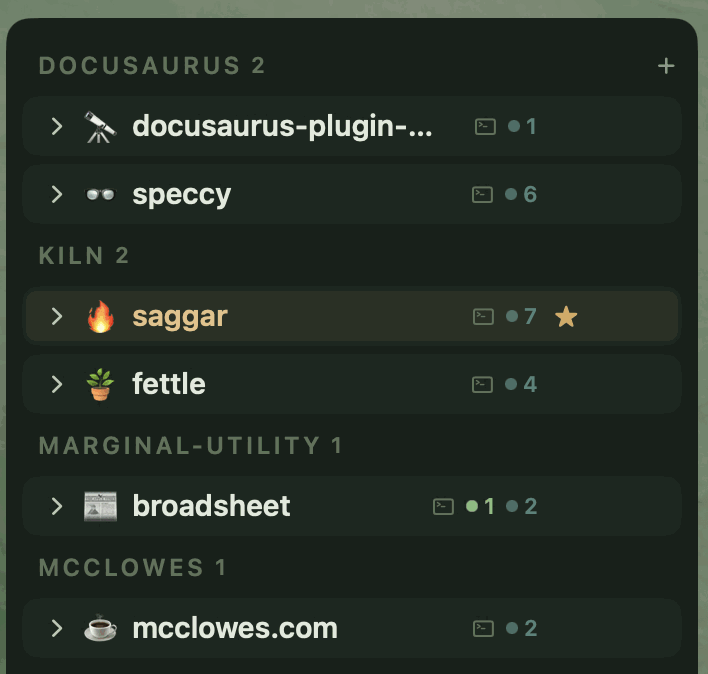
It's off by default. Settings → Interface → Workspace.

Driving Saggar from the CLI
saggar can register a project without stealing focus, and configure, reuse, or close idle terminals. Claude terminals keep a turn ledger too, readable with saggar turns. Closing one warns you when subagents are still running, or when their results haven't been collected.